
Your SEO data, right inside the conversation
It's an official app installed directly inside ChatGPT. Once enabled, ChatGPT can call Ubersuggest in real time to fetch SEO data and weave the results into the answer you're already chatting about. It runs on the same tools as our MCP server, so the full Ubersuggest toolset is there — no dashboard, no tab switch, no copy-paste.
Skip dashboards and exports. Ask things like "What keywords should I target around digital marketing?" and ChatGPT pulls the answer from Ubersuggest.
No tab switching. ChatGPT calls Ubersuggest live when it needs data, not cached snapshots. You get current search volume, difficulty, and suggestions.
Enable the app once in ChatGPT. It's available across every conversation, web, mobile, and desktop, from that point on.
What You Can Do
All 42 Ubersuggest tools are available inside ChatGPT — the same set our MCP server exposes. Describe what you're looking for in natural language and the app pulls the numbers.
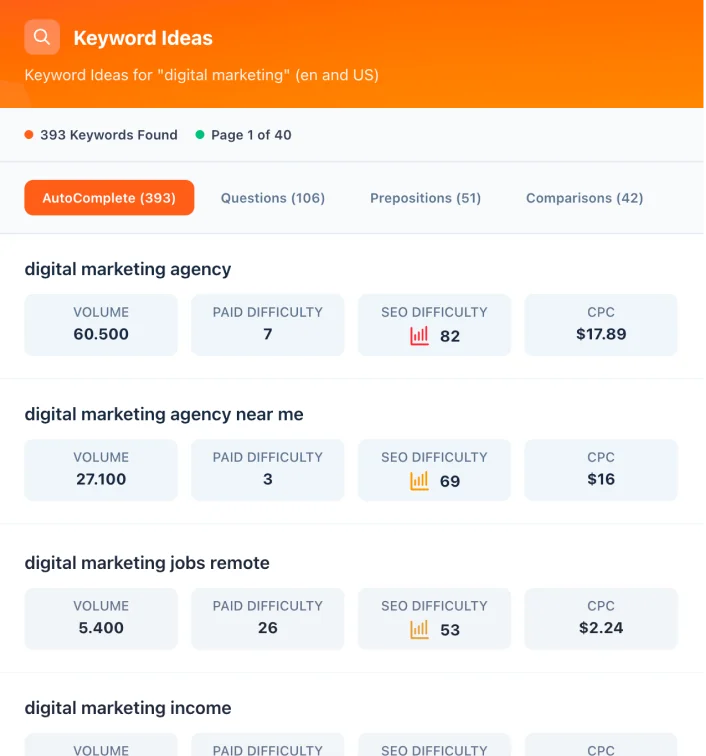
Keyword Research
The one tool with a visual widget inside ChatGPT: browse search volume, difficulty, related keywords and suggestions in a real table, right in the conversation. Every other tool answers inline as data.
Domain Analysis
8 toolsTraffic, keywords, authority, top pages, and competitors
Keyword Research
7 toolsSearch volume, difficulty, suggestions, SERP, and trends
Backlinks
5 toolsBacklink profile, referring domains, and opportunities
Site Audit
5 toolsSEO issues, Core Web Vitals, and recommendations
AI Brand Visibility
3 toolsBrand mentions and share of voice across AI answers
Content
3 toolsContent ideas and social sharing data
Projects
7 toolsRank tracking, monitoring, and SEO opportunities
Utilities
4 toolsSite validation and location data
Get Ubersuggest inside ChatGPT in seconds
Open the app, sign in with your Ubersuggest account, and start asking keyword questions in natural language. No setup, no plugins, no extra tabs.
Requires a free or paid ChatGPT account, plus an Ubersuggest account to sign in with.